Introduction: API Reference

Authentication

  • What Is Webhook Event
  • Setup Live Webhook
  • Test & Validate Webhook
  • Sample Payload
  • Edit Webhook
  • Delete Webhook

  • Setup Postman
  • CallerDesk <> Postman

  • Add Member
  • Update Member
  • Delete Member
  • Get Members List

  • Call Group List
  • Update Call Group
  • Create Call Group
  • Delete Call Group
  • Get Group details by id
  • Get Group Time Schedule

  • Call Report API
  • Live Call API
  • Call Routing API

  • Click2Call API ( Normal )
  • Click2Call API ( with CallGroup )
  • Reverse C2C API ( B Party=Member Number )
  • Reverse C2C API ( B Party=Deskphone with CallGroup )

  • Get Contact List
  • Add Contact
  • Edit Contact
  • Delete Contact

  • Bulk Voice Brodcast
  • Bulk Voice Brodcast Report

Voice OTP API's

  • Block Number
  • Unblock Number

  • Add Sender id
  • Get Sender id
  • Delete Sender id's

  • Activity Trail History
  • Profile & Balance
  • IVR Number List
  • Member Analysis

  • Notification List
  • Update Notification
    • Version 2.0 API
    • Previous Version 1.0

    Introduction: API Reference

    Authentication

    • What Is Webhook Event
    • Setup Live Webhook
    • Test & Validate Webhook
    • Sample Payload
    • Edit Webhook
    • Delete Webhook

    • Setup Postman
    • CallerDesk <> Postman

    • Add Member
    • Update Member
    • Delete Member
    • Get Members List

    • Call Group List
    • Update Call Group
    • Create Call Group
    • Delete Call Group
    • Get Group details by id
    • Get Group Time Schedule

    • Call Report API
    • Live Call API
    • Call Routing API

    • Click2Call API ( Normal )
    • Click2Call API ( with CallGroup )
    • Reverse C2C API ( B Party=Member Number )
    • Reverse C2C API ( B Party=Deskphone with CallGroup )

    • Get Contact List
    • Add Contact
    • Edit Contact
    • Delete Contact

    • Bulk Voice Brodcast
    • Bulk Voice Brodcast Report

    Voice OTP API's

    • Block Number
    • Unblock Number

    • Add Sender id
    • Get Sender id
    • Delete Sender id's

    • Activity Trail History
    • Profile & Balance
    • IVR Number List
    • Member Analysis

    • Notification List
    • Update Notification

    Digidonar <> Postman

    Setup Digidonar API collection

    Clicking this below option will allow you to begin adding the Digidonar API collection once Postman has been successfully installed or logged in on your computer.

    Run in Postman ( Please contact your account manager to get the Digidonar postman collection )

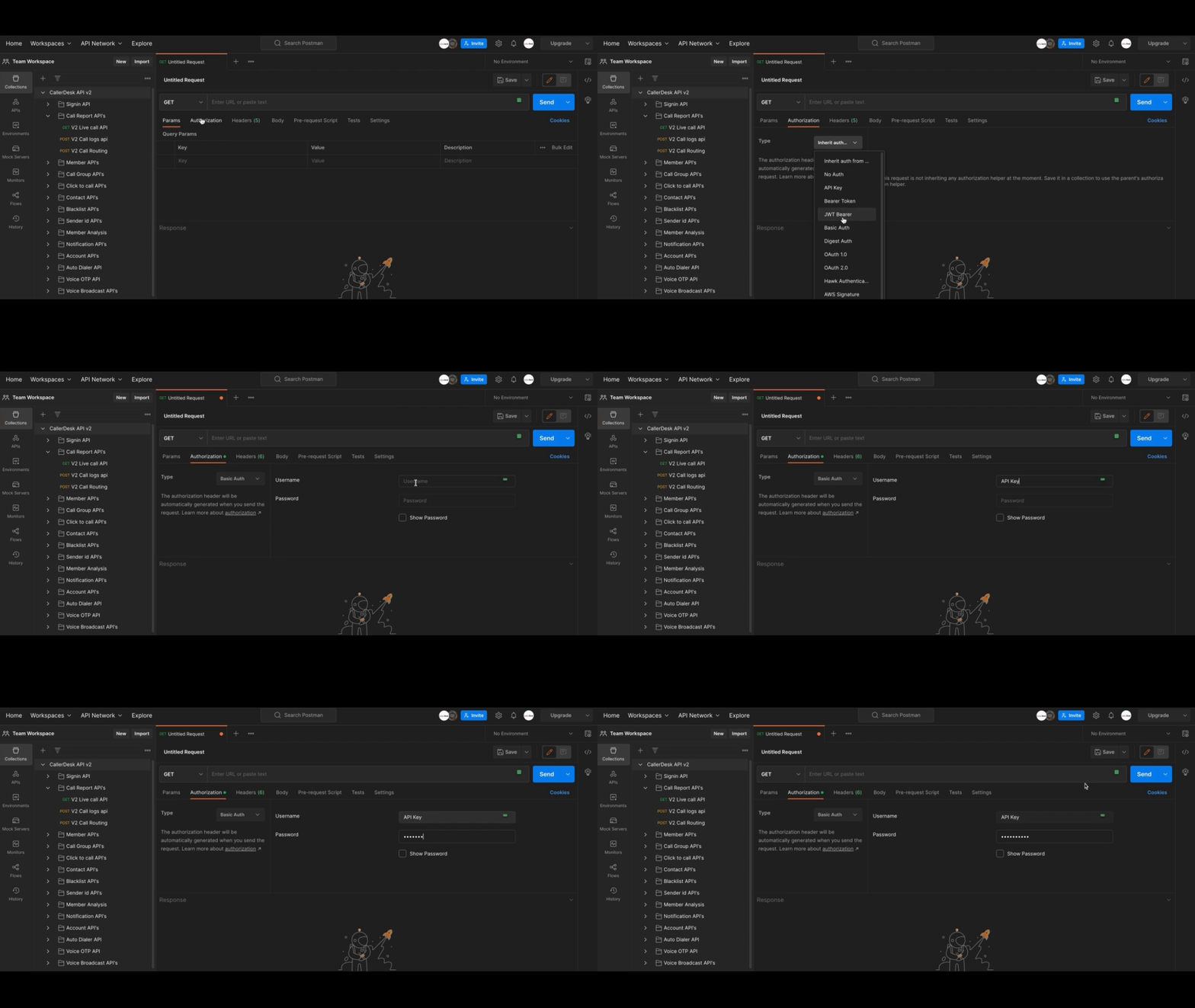
    Authorization

    Adding your 'Basic Auth' is the easiest method to authorize your requests. To accomplish this, you must first locate your API key & Secret Key (for instructions, visit here )

    After that, proceed with the remaining steps, which are as follows:

    • To give Postman permission to process your requests, you will need to add your Basic Auth to Postman by selecting the drop-down menu (the icon with three dots) near collection name.
    • Choose "Edit".
    • On the newly created edit screen, navigate to the "Authorization" tab and click there.
    • Add the type of authorization method as 'Basic Auth' ,
    • And then enter the "your Digidonar account API Key" as "username" & "Secret Key" as password.
    • Now you may verify everything by clicking the "Update" button.

    At this point, you are able to make your initial requests. Make certain that "Basic Auth" is selected as the authorisation type under the authorisation tab.
    Updated 24 Apr 2023 Did this page help you?

    Previous
    Setup Postman

    Next
    Team Members

    Introduction: API Reference

    Authentication

    • What Is Webhook Event
    • Setup Live Webhook
    • Test & Validate Webhook
    • Sample Payload
    • Edit Webhook
    • Delete Webhook

    • Setup Postman
    • CallerDesk <> Postman

    • Add Member
    • Update Member
    • Delete Member
    • Get Members List

    • Call Group List
    • Update Call Group
    • Create Call Group
    • Delete Call Group
    • Get Group details by id
    • Get Group Time Schedule

    • Call Report API
    • Live Call API
    • Call Routing API

    • Click2Call API ( Normal )
    • Click2Call API ( with CallGroup )
    • Reverse C2C API ( B Party=Member Number )
    • Reverse C2C API ( B Party=Deskphone with CallGroup )

    • Get Contact List
    • Add Contact
    • Edit Contact
    • Delete Contact

    • Bulk Voice Brodcast
    • Bulk Voice Brodcast Report

    Voice OTP API's

    • Block Number
    • Unblock Number

    • Add Sender id
    • Get Sender id
    • Delete Sender id's

    • Activity Trail History
    • Profile & Balance
    • IVR Number List
    • Member Analysis

    • Notification List
    • Update Notification